“Oops — wrong QR. Let me try that again.”
“Which app do you take?”
“Do you have Venmo? PayPal? Cash App?”
How many times have you heard this?
Same question, day after day.
Saturday at the market, Friday night on the sidewalk, Sunday at brunch. One QR and one link show the payment apps you already use. People pick the app they have and pay you directly.
Make paying you easy.
Your payment apps, already set up, shown together behind one QR and one link. Pick what sounds like you.
Free to build and preview · $1.99/mo to go live
Your payment apps.
One link. One QR. Done.
Add your PayPal, Venmo, Cash App, and card links — your customer scans your QR, taps whichever of your apps they use, and pays you directly. No credit card to start. Subscribe only when you go live.
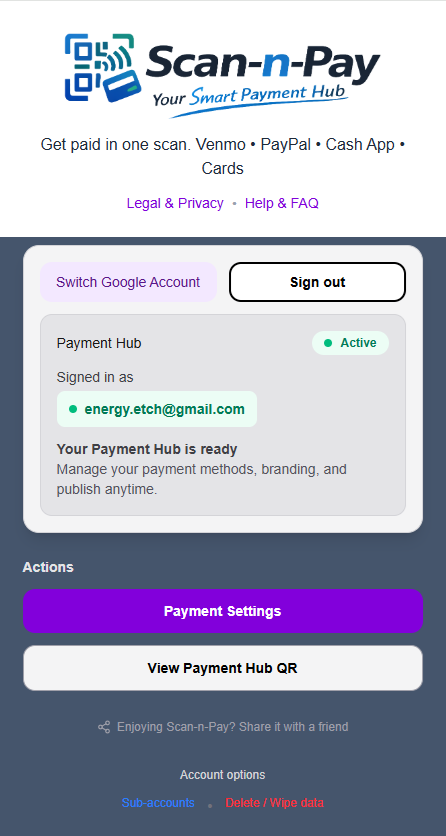
Sign in with Google — no new passwords. Your hub is created right away, ready to configure.
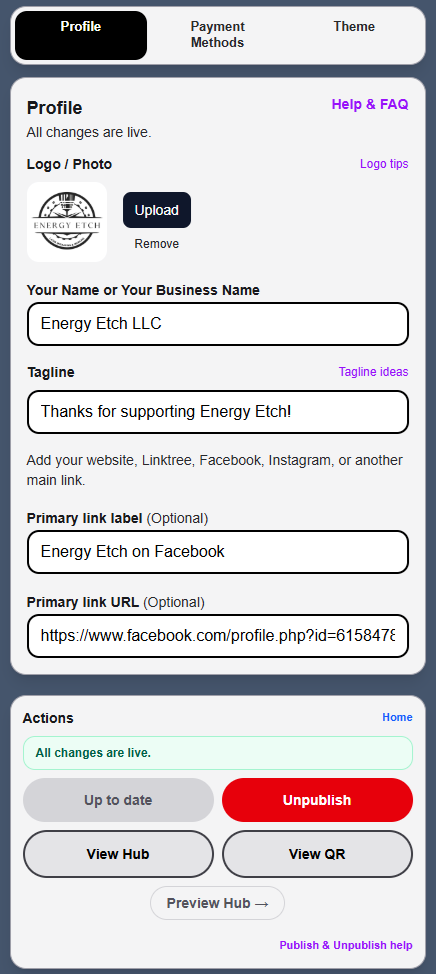
Add your own name, logo, and tagline — the Energy Etch example shown here is just a sample. Your hub will reflect your brand.
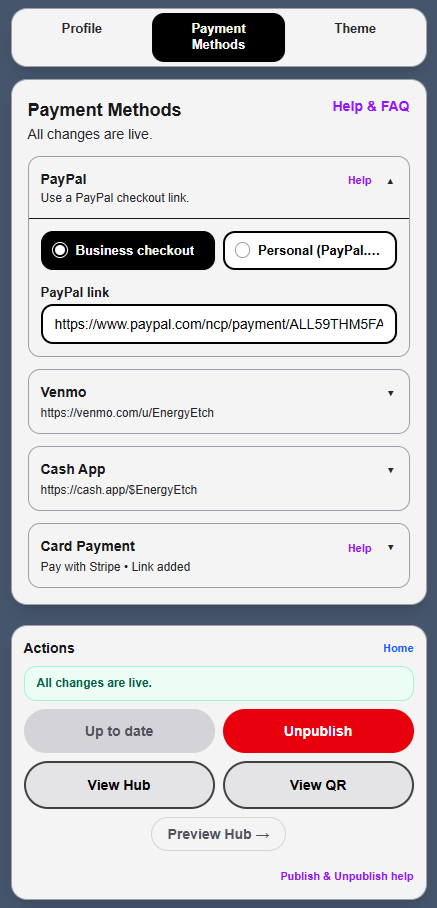
Paste in your existing payment links — your card processor, peer-to-peer apps, and more. Each one becomes a button on your hub.
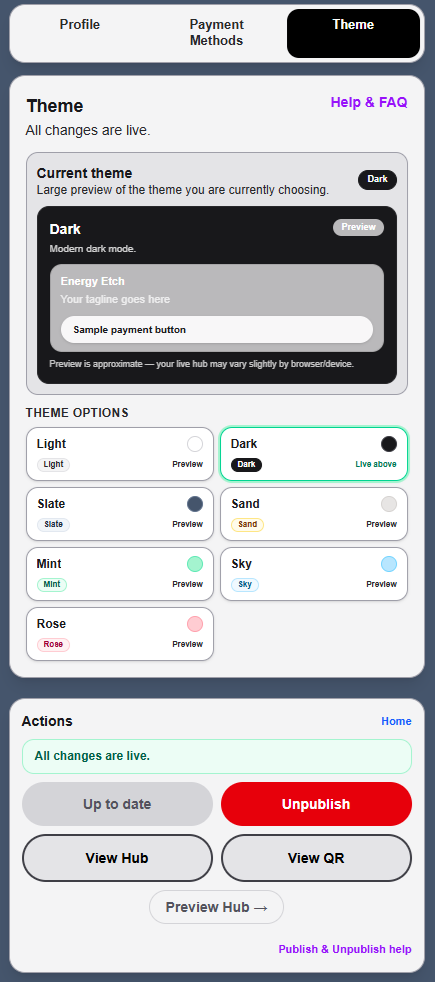
Pick from seven themes — Light, Dark, Slate, Mint, Rose, Sand, or Sky. Switch anytime, and your hub updates right away.
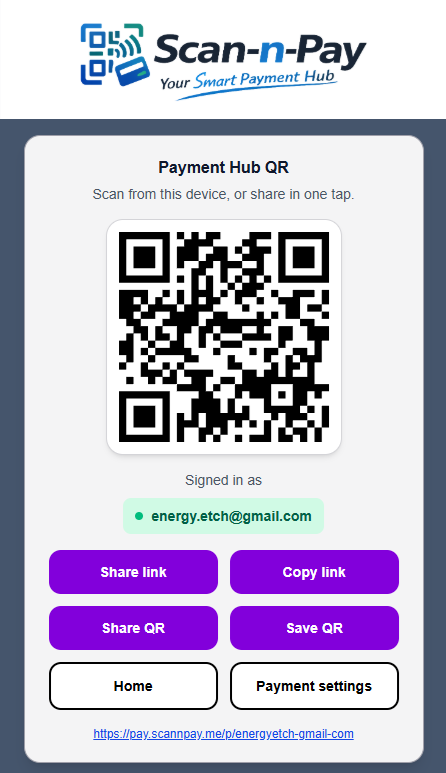
Your unique QR code and payment link are ready. Download the QR, copy the link, or share directly — print it, text it, or drop it in your bio.
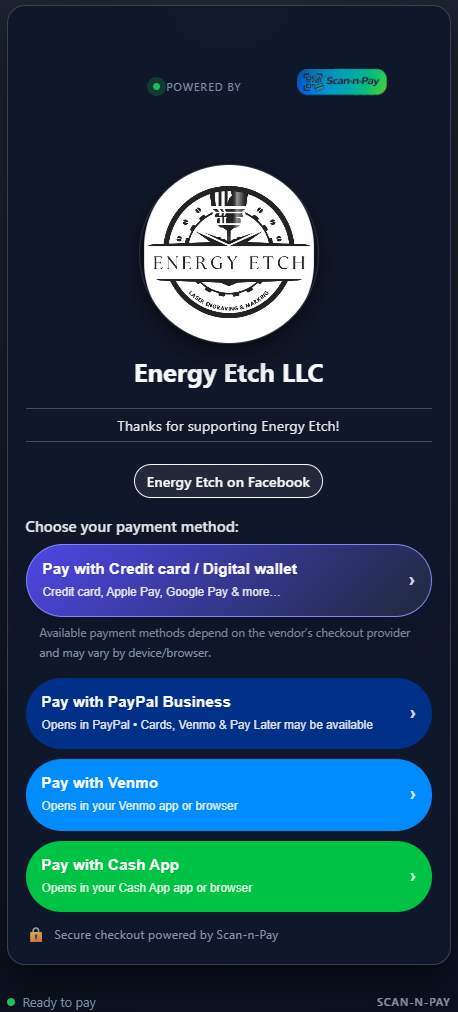
This live example shows Energy Etch LLC — yours will show your name, logo, and payment links. Your payer taps whichever of your apps they use and pays you directly.
Add the public payment links you already use — your hub displays them together in one place
How Scan-n-Pay works: We don't process payments or move money. We're a single hub for your payment apps — we display the payment links you already use, your payer picks the one they prefer, and we send them straight to that provider's own page. The transaction happens inside the payment provider they choose.
Set up in minutes.
No hardware. No new payment accounts to open. Add the links you already use and go live.
See the hub that started it all.
Energy Etch LLC — the small business behind Scan-n-Pay — built this app to stop juggling multiple QR codes at their own vendor booth. This is Energy Etch's actual live hub, used at markets and pop-ups. Tap around to see what Energy Etch customers see. Yours would look like this, with your name, your brand, and your payment links.
Two ways to see it live — scan the QR or tap the link. Same hub, your choice.
 Scan with your phone camera to open the live hub
Real hub. Real payment buttons. This is Energy Etch's hub — not a mock-up.
The more apps you add, the more people can pay you.
The more payment links you have added, the more people you can reach. Most of these cost nothing to sign up for, and setup takes a few minutes.
Your hub shows exactly what you accept. Add up to four payment links — your payer sees the methods you accept and taps one they use.
These payment services typically cost nothing to sign up for. PayPal, Venmo, and Cash App have free personal accounts. Square and Stripe cost nothing to open and charge a processing fee when you take a payment. Each provider sets its own fees, so check their sites for details.
One QR for the links you add. Add your links to your hub once, together in one place behind a single QR code.
Account setup costs and transaction fees are set by each provider and subject to change. Visit their websites for current pricing.
Scan-n-Pay is not affiliated with or endorsed by any of the payment services listed above. These are suggestions only — use whichever services work best for you.
Make it yours — personal or professional.
Seven themes to match your style. Whether it's your name and photo or your business logo and brand — your payers see you, not a generic page.
Simple by design. Powerful in practice.
Simple pricing. No surprises.
Free to build and preview. Subscribe only when you're ready to go live. Cancel anytime.
One subscription covers you plus up to 4 others — family members or teammates whose Google accounts are already on your device. Each person gets their own independent hub, their own QR, and their own payment links. Under one plan.
- Up to 5 independent payment hubs
- 7 themes included
- Custom name, photo or logo & tagline
- Add PayPal, Venmo, Cash App, Square, Stripe & more
- QR download, share link & copy link
- Web + Android app access
- Google Sign-In — no new passwords
- No ads on your hub. No data selling.
Sign in with Google — no credit card, no commitment. Build your hub and preview it privately. Subscribe only when you're ready to go live.
One vendor's setup, start to finish.
Watch a vendor add the payment apps they already take and share them as one QR. Your payment apps. One QR. One professional payment page.
More for market vendors →In-person or online — same hub, both worlds.
Print it and tape it to your table. Drop it in a group chat. Add it to your link-in-bio page or email signature. Or show your phone, and people can scan right off your screen. However your people find you, one destination shows the payment options you accept.
Already have a link-in-bio page? Add your Scan-n-Pay link as one “Pay me,” “Tip me” or “Donate” button. People tap once and land right on your payment options instead of scrolling your whole profile.
Get paid without
the back-and-forth.
Build your hub, then go live for $1.99 a month.
No credit card required to get started.
The app is only needed to build and configure your hub. Once it's live, your QR code and link open in a web browser, so your customers don't need an app.
No download needed. Works in the web browser on phones, tablets and computers.
Phone, tablet, or computer — if it has a browser, it works
Also available as an Android app
Get it on Google PlaySubscribe when you're ready to go live. Cancel anytime.